
Click here to see the new 2018 version
Vehicle Owner’s Maintenance Database Software
Keep a record of all service and work done on your vehicles including fuel records, spare parts and much more.
TESTED 100 % COMPATIBLE WITH ANY WINDOWS XP VISTA or WINDOWS 7/8/10/11
Very easy to use for those with little computer experience
Suit any Vehicle, Holden Monaro Ford Nissan Toyota Honda BMW Mercedes Subaru Lexus Hyundai.
A must have for any motorist or enthusiast
Easy to use for those with little computer experience
You can record details for more than one vehicle. Suitable for the whole family or a fleet.
Suitable for any type of car, motorcycle, truck or plant and equipment
*** Imperial version available using Inches and Gallons for USA purchasers ***
Based on Microsoft Access which ensures future compatability
Program is supplied with Microsoft Access Runtime for users who do not have Microsoft Access
The main form allows you to enter the details for each vehicle
- Allows insertion of up to 9 images of each vehicle
- Printing of records
- Selected fields have editable dropdowns where you can enter commonly used data
- 3 editable links per record where you can link to any file on your PC such as the sales receipt or document files
- Automatic Vehicle Number Generation
- Fields for Make, Model, Colour, Type, Wheels, Tyres, Tyre Pressure, Fuel Type, Purchased From, Owner, Warranty Expiry, Current Insurer, Insurance Expiry, Policy Number, Sold To, Engine Number, Chassis Number(VIN), Engine, Transmission, Start Odometer, Identification, Manufacture Date, Registration Expiry, Registration Number, Purchase Date, Sale Date, Vehicle Number, Purchase Price, Sale Price, Catalog Value, Sold(checkbox) and Remarks
- Running totals for Purchase Price, Sale Price and Catalog Value
- Buttons for Previous Record, Next Record, Add New Record, Delete Current Record, Duplicate Record, View All Records, Service Records, Fuel Records, Consumables, Find Record, Edit Filter, Apply Filter, Remove Filter, Exit
- Dropdown index for Vehicles
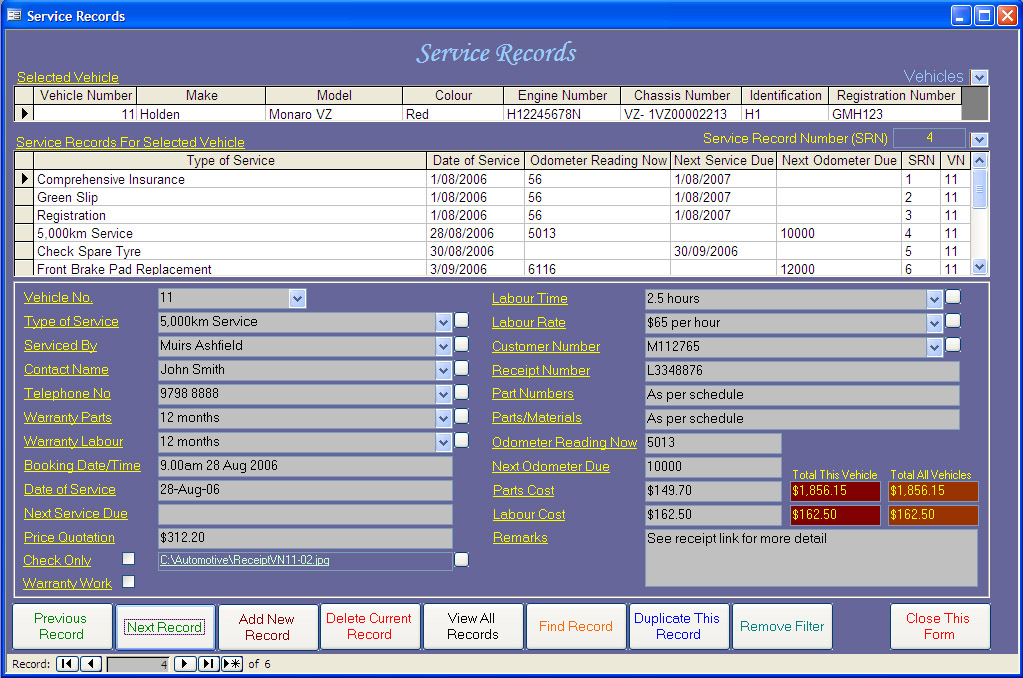
The service records form allows you to record details of all sevices performed on each vehicle
- Automatic Service Record Number Generation
- A subform which displays selected vehicle details
- A subform which displays selected fields for all service records for the vehicle and allows record selection
- Fields for Service Record Number, Vehicle Number, Type Of Service, Serviced By, Contact Name, Telephone Number, Warranty Parts, Warranty Labour, Booking Date/Time, Date Of Service, Next Service Due, Price Quotation, Labour Time, Labour Rate, Customer Number, Receipt Number, Part Numbers, Parts/Materials, Odometer Reading Now, Next Odometer Due, Parts Cost, Labour Cost, Remarks, Check Only(checkbox), Warranty Work (checkbox)
- Totals for Parts Cost and Labour Cost for each vehicle and for all vehicles
- Buttons for Previous Record, Next Record, Add New Record, Delete Current Record, Add New Record, View All Records, Find Record, Duplicate This Record, Remove Filter, Close This Form.
- Selected fields have editable dropdowns where you can enter commonly used data
- Printing of records
- Dropdown indexes for Service Records and Vehicles
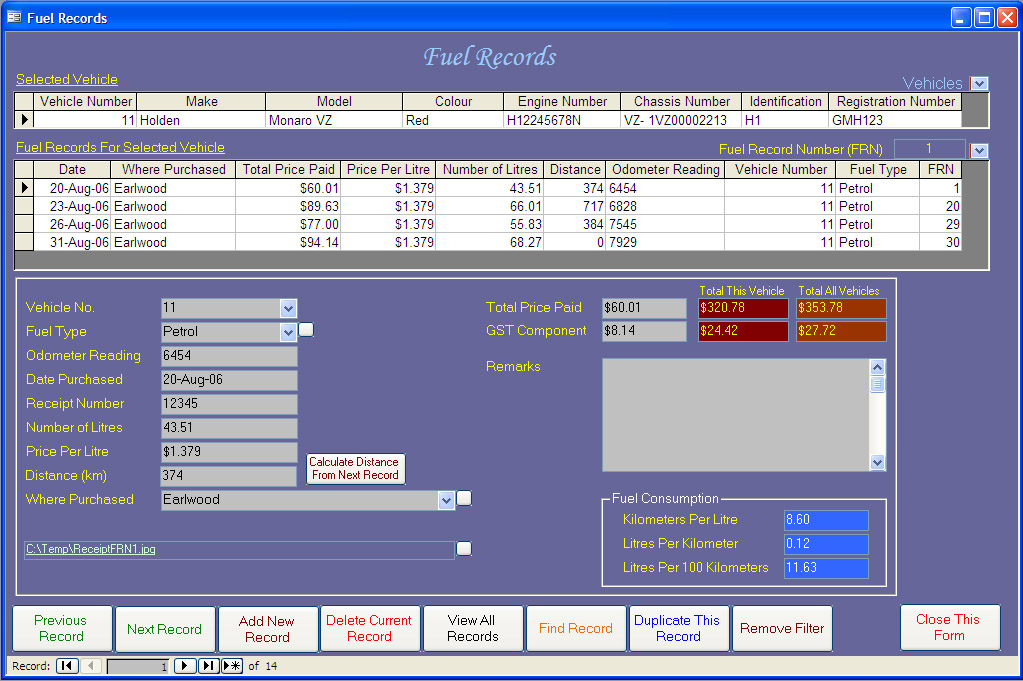
The fuel records form allows you to record details of all fuel purchases made for each vehicle.
- Included functions for automatic display of fuel economy in Km per Litre, Litres per Km and Litres per 100km.
- An auto distance calculate button which will calculate distance based on the odometer reading of the following fuel record for the vehicle
- A subform which displays selected vehicle details
- A subform which displays selected fields for all fuel records for the vehicle and allows record selection.
- Fields for Fuel Record Number, Vehicle Number, Fuel Type, Odometer Reading, Date Purchased, Receipt Number, Number Of Litres, Price Per Litre, Distance, Where Purchased, Total Price Paid, GST Component and Remarks.
- An editable link per record where you can link to any file on your PC such as a scanned image of a sales receipt for the fuel purchased.
- Totals for Total Price Paid and GST Component for each vehicle and for all vehicles
- Selected fields have editable dropdowns where you can enter commonly used data
- Dropdown indexes for Fuel Records and Vehicles
- Buttons for Previous Record, Next Record, Add New Record, Delete Current Record, Add New Record, View All Records, Find Record, Duplicate This Record, Remove Filter, Close This Form, Calculate Distance From Next Record.
- Printing of records
- Automatic Fuel Record Number Generation
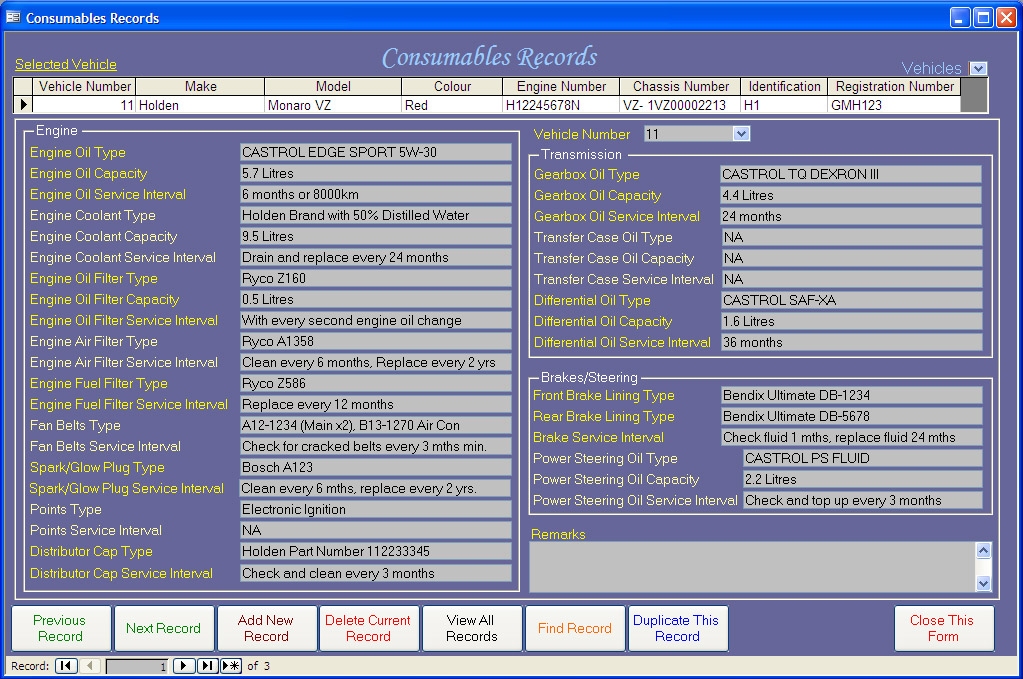
The Consumable Form allows you to keep a record for each vehicle of consumables used such as oil types, service intervals and quantity. A useful list of items you can reference when necessary
- Fields available for commonly used consumables where you can list their type, capacity and service intervals.
- Engine: Oil, Oil Filter, Coolant, Air Filter, Fuel Filter, Fan Belts, Spark/Glow Plugs, Points, Distributor Cap
- Transmission: Gearbox Oil, Transfer Case Oil, Differential Oil
- Brakes/Steering: Front Brake Lining Type, Rear Brake Lining Type, Power Steering Oil
- A dropdown index for vehicle selection
- Selected fields have editable dropdowns where you can enter commonly used data
- CDROM Suitable for Windows 2000 SP3 or later including Windows 7/8/10/11 Windows XP and Windows Vista. 32 and 64 Windows supported. Not suitable for Windows 8 RT.
- Screen size 1024 x 768.

After payment is received the program can me made available by download to purchasers of the CD or USB so you may commence using it before you receive the CD or USB by post. Please contact me by clicking here and letting me know that you want the download
Price $27.00AUD
Bank deposit payment available to Australian purchasers.
Please contact me by clicking here for details.
Paypal Checkout
(For purchasers who do not have Paypal: Payment can also be made by credit card or debit card through Paypal checkout without joining Paypal)
Supply by download only
—————————————————————————————————————————————————————————————-
For anything posted please ensure that your postal address in Paypal checkout is correct prior to purchase or advise me using the email on the Contact Us page.
Supplied by posted CDROM
—————————————————————————————————————————————————————————————-
Supplied by posted USB